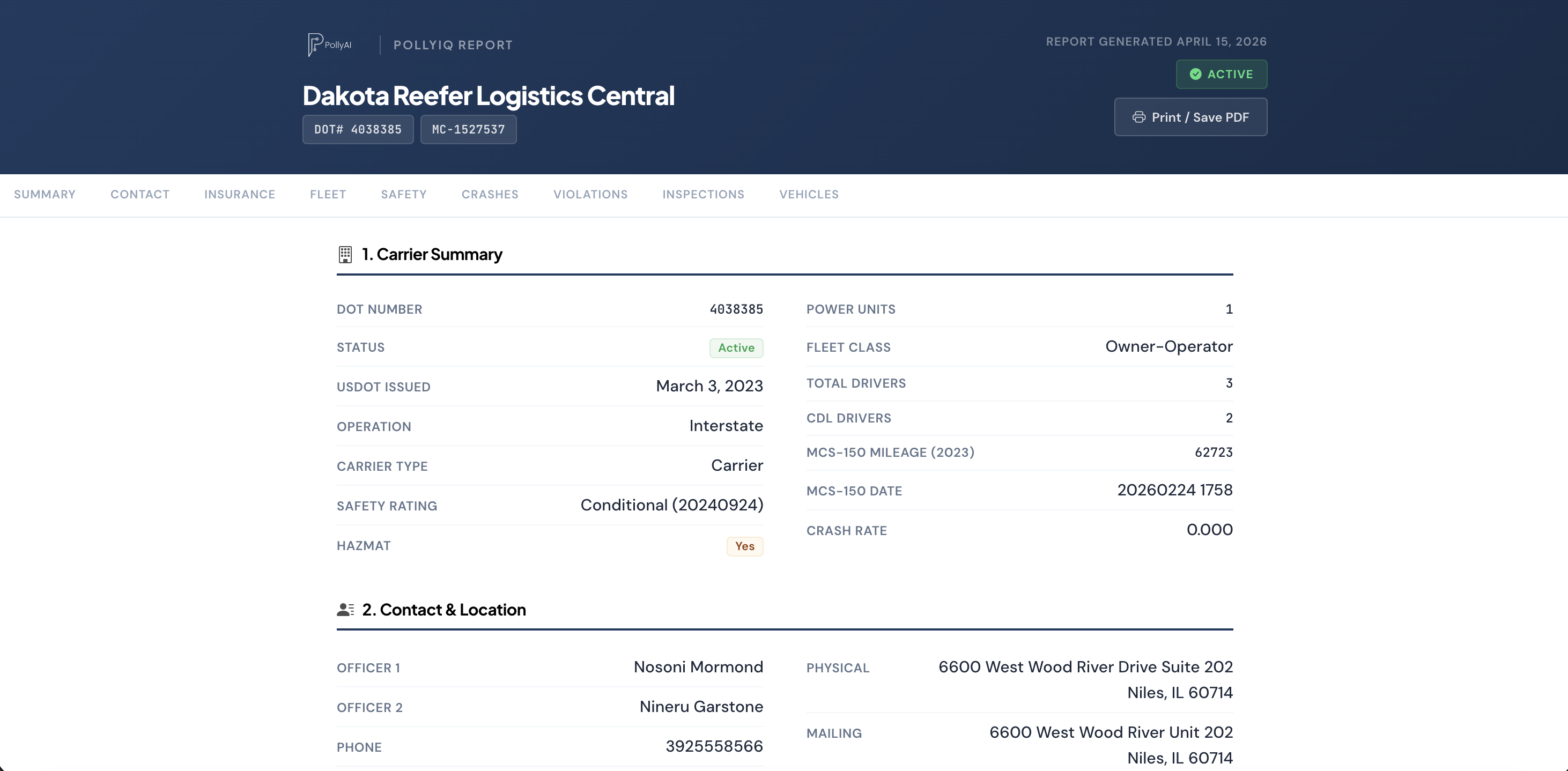
Freight brokers made carrier vetting a standard practice: check the carrier before you tender the load. Trucking insurance agents run the same play with more on the line. A broker who skips vetting risks one shipment. An agent who skips it puts a full policy term on the book, and the signals that predict a loss-ratio problem were sitting in public FMCSA data the whole time.
This guide covers the 10 checks worth running on any motor carrier before you quote, where each data point lives, and how to compress the whole routine from 30 minutes of tab-hopping into one report.
What Carrier Vetting Means for an Insurance Agent
Most carrier vetting content is written for freight brokers and shippers, and most vetting tools score carriers on the question "will this company deliver my load?" Tools like Carrier Assure grade carriers for shippers the way a credit bureau grades borrowers. If that is the searcher you are, our Carrier Assure alternative breakdown covers that category in depth.
An agent asks a different question: "what will this company cost to insure?" The inputs overlap almost completely, which is why the same public records serve both audiences. Authority history, safety performance, crash record, inspection results, and equipment age are exactly what an underwriter prices, so reviewing them before you quote does three things: it filters out risks your markets will decline anyway, it arms the submission with data the underwriter respects, and it hands you talking points the incumbent agent never mentioned.
The 10-Point Carrier Vetting Checklist
The checks group into four categories, all built on records every carrier already files or generates at roadside.
Operating authority and history
Active versus inactive status, how long the authority has existed, and any revocations or reinstatements. An authority that has cycled off and on is a materially different risk than one with 8 clean years.
Safety rating, OOS rates, inspections
Out-of-service rates against the national averages (roughly 21 percent vehicle, 6 percent driver), plus the violation patterns behind them. Brakes and tires point at maintenance; logbook violations point at operations.
24 months of crash history
DOT-recordable crashes with tow-aways, injuries, and fatalities broken out. One crash on a 20-truck fleet is noise; three on a 5-truck fleet is a pattern the underwriter will find anyway.
Fleet size and equipment
Power units versus drivers, and VIN-level year, make, and model from roadside activity. A fleet that reports 10 trucks but inspects like 20 has a story you want to hear before the carrier does not tell it.
The 10 Checks Before You Quote
- Authority status: active, and in the right operating class
- Authority age: new venture or established, with any gaps explained
- Insurance filings: current liability filing and who holds it now
- Safety rating: satisfactory, conditional, or unrated
- Vehicle OOS rate: versus the roughly 21 percent national average
- Driver OOS rate: versus the roughly 6 percent national average
- Crash count: 24 months, severity broken out
- Violation patterns: maintenance versus driver-qualification signals
- Fleet consistency: reported power units versus observed activity
- Cargo fit: commodities that match the markets you represent
Two habits make the checklist work in practice. First, read the signals together, not alone. A conditional safety rating on a carrier with falling OOS rates and 2 clean years of inspections is a risk trending the right way, and often a better prospect than a clean-rated fleet trending the wrong way, precisely because the incumbent is about to non-renew one and take the other for granted. Second, date the data. Crash counts and inspection results roll on a 24-month window, while self-reported items like power units can be years stale, so weight the roadside record over the paperwork whenever the two disagree.
Where the Vetting Data Lives
Every check above runs on public data. The FMCSA's SAFER system exposes authority status, fleet size, and inspection summaries one DOT number at a time. Carrier-reported details like commodities hauled and power-unit counts come from the MCS-150 filing, and knowing how fresh that self-reported data is matters; our guide to MCS-150 data covers what carriers file and how often it goes stale.
The catch is not access, it is format. SAFER answers one carrier at a time, keeps no watchlist, and exports nothing you can hand an underwriter. Crash and inspection detail lives in separate FMCSA systems from the authority record. Running the full 10-point check by hand means 5 or 6 tabs per prospect and 20 to 30 minutes of copying, and the output is a legal pad, not a document.
Carrier Vetting Software: One Report Instead of Six Tabs
This is the gap the carrier vetting software category exists to close, whether the label on the tool says carrier monitoring, carrier selection software, or carrier intelligence. For agents, the useful shape of the answer is a single dossier per DOT number.
That is what the PollyIQ Report is: one page per carrier with authority status and history, safety scores, 24 months of roadside activity, crash history, inspection citations, and VIN-level equipment, generated in about 60 seconds and print-ready. Walk into the sales call with it, or attach it to the submission so the underwriter sees the risk the way you priced it. The full breakdown of what it covers lives on the truck carrier reports page.
Vetting is also the second half of prospecting. The same FMCSA data that scores one carrier filters 2M+ of them, so the list you prospect from can be pre-vetted by state, fleet size, equipment, and renewal window before you send the first email. PollyAI does both from one login, with plans starting at $39 per month.
Carrier Vetting FAQs
What is carrier vetting?
Checking a motor carrier's operating authority, insurance filings, safety record, and equipment before doing business with it. Brokers vet before tendering loads; agents vet before quoting, because the same record predicts insurability and loss ratio.
Is carrier safety data public?
Yes. Authority status, filings, inspections, OOS rates, and crash counts are public for every registered carrier. SAFER shows them one DOT number at a time; data platforms aggregate the same records into lists and reports.
What OOS rate is considered high?
Benchmark against the national roadside averages: roughly 21 percent vehicle and 6 percent driver. Meaningfully above either, sustained across 24 months, is a maintenance or driver-qualification signal that becomes a claims signal.
Do insurance agents need carrier vetting software?
The data is free; the time is not. By hand the 10-point check costs 20 to 30 minutes per prospect and produces nothing shareable. Software compresses it to one report per DOT number, which is what makes vetting a list of 50 prospects practical.
Vetting tells you which carriers to quote; the report is also a door-opener. If a prospect or underwriter brings up CAB reports, our guide to what a CAB report is explains how those subscription reports compare to FMCSA-native dossiers.