Bottom Line
The free carrier snapshot is enough when you just need to confirm a carrier exists, check that its operating authority is active, and glance at its 24-month inspection and crash summary before a first call.
You need a full carrier report when you are underwriting or prospecting at volume and need CSA BASIC scores, insurance renewal timing, VIN-decoded equipment, and contact data, all in one place instead of stitched together across three separate FMCSA systems.
The snapshot is a lookup. A carrier report is a working document. Most agents use both, and the second one is where the quoting decision actually gets made.
If you write trucking insurance, you have pulled a carrier snapshot. It is the free FMCSA record every agent checks to confirm a motor carrier is real before spending time on it. Type in a USDOT number and you get the carrier's authority status, fleet size, and a two-year summary of inspections and crashes. It is fast, it is public, and it is the correct first step. The problem starts the moment you try to make an underwriting or prospecting decision from it, because the carrier snapshot was built for public safety lookups, not for the questions an insurance agent actually asks.
This guide walks through what the FMCSA carrier snapshot shows, the four things it leaves out that matter most to agents, and when it is worth pulling a full carrier report instead.
What Is the FMCSA Carrier Snapshot?
The carrier snapshot is officially the SAFER Company Snapshot, a free public record maintained by the Federal Motor Carrier Safety Administration. You look up a carrier by USDOT number, MC or MX number, or exact company name on the FMCSA SAFER Company Snapshot site, and it returns a single-page summary drawn from that carrier's registration and safety records.
What the free carrier snapshot shows
- Identity and authority. Legal name, DBA name, physical address, phone, USDOT number, MC/MX number, entity type, and whether the operating authority is active, which is the single most important field before you quote.
- Operation profile. Carrier operation (interstate or intrastate), operation classification, and the cargo types the carrier is authorized to haul.
- Fleet size. Power units and driver count, pulled from the carrier's most recent MCS-150 filing.
- Safety summary. A 24-month tally of US inspections by category (vehicle, driver, hazmat), the out-of-service counts against national averages, and a crash summary broken into fatal, injury, and tow-away.
- Safety rating. The carrier's rating (Satisfactory, Conditional, Unsatisfactory, or none), plus the rating and review dates.
For a quick "is this carrier who they say they are" check, that is a solid free tool, and no paid product replaces it for that job. Much of the underlying detail traces back to the carrier's registration form, which is worth understanding on its own. See our guide to what an MCS-150 is for how that filing feeds the snapshot.
What the carrier snapshot leaves out
Here is where the free record stops short for an insurance agent. Four gaps matter most.
- No CSA BASIC scores. The snapshot gives raw inspection and out-of-service counts, but not the percentile BASIC scores underwriters actually rate on. Those live on the separate FMCSA Safety Measurement System site, and the deeper view requires an FMCSA Portal login.
- No insurance timing. The snapshot confirms authority is active but does not show the policy or its expiration date. Insurance filings live on the FMCSA Licensing and Insurance system, a different lookup entirely, and renewal timing is the whole game for prospecting.
- No equipment detail. You get a power-unit count, not what the fleet actually runs. There is no VIN-decoded Year, Make, and Model, which is exactly what you need to rate physical damage on the equipment.
- No contact data for outreach and stale timing. There is a phone number and mailing address, but no email, and the fleet and address fields are only as current as the carrier's last MCS-150 update, which can be up to two years old.
Free Carrier Snapshot vs a Full Carrier Report
To make a quoting decision, agents pull the scattered pieces together. That is what a full carrier report does, whether it is a paid underwriting report like a CAB report or PollyAI's PollyIQ Report. The table shows where each option lands on what agents weigh.
| What you need | Free FMCSA carrier snapshot | Full carrier report |
|---|---|---|
| Cost | Free | Paid (per report or subscription) |
| Authority status and entity type | Yes | Yes |
| 24-month inspection and crash summary | Yes | Yes |
| CSA BASIC percentile scores | No (separate SMS site) | Yes, in one view |
| Insurance expiration and renewal timing | No (separate L&I system) | Yes |
| VIN-decoded equipment (Year, Make, Model) | No | Yes, on the PollyIQ Report |
| Contact data for outreach | Phone and address only | Phone, address, and email |
| Print-ready dossier for a file or underwriter | No (screen lookup) | Yes |
| Built into a prospecting workflow | No | Yes, with PollyAI |
When the Free Snapshot Is Enough, and When It Is Not
The free carrier snapshot is not a lesser version of a paid report. It is a different tool for a different job. Use this to decide which one the moment calls for.
The free snapshot is enough when
- You are verifying one carrier is real and active before a call
- You need the authority status and a fast safety glance, nothing more
- You are checking a single MC number a broker or insured just gave you
- You are not making an underwriting or pricing decision yet
You need a full carrier report when
- You are underwriting and need CSA BASIC scores in the same view
- You are prospecting and need to know when policies renew
- You are rating physical damage and need VIN-decoded equipment
- You want a print-ready dossier to send an underwriter or drop in a file
- You are working carriers at volume, not one lookup at a time
What a Full Carrier Report Adds: The PollyIQ Report
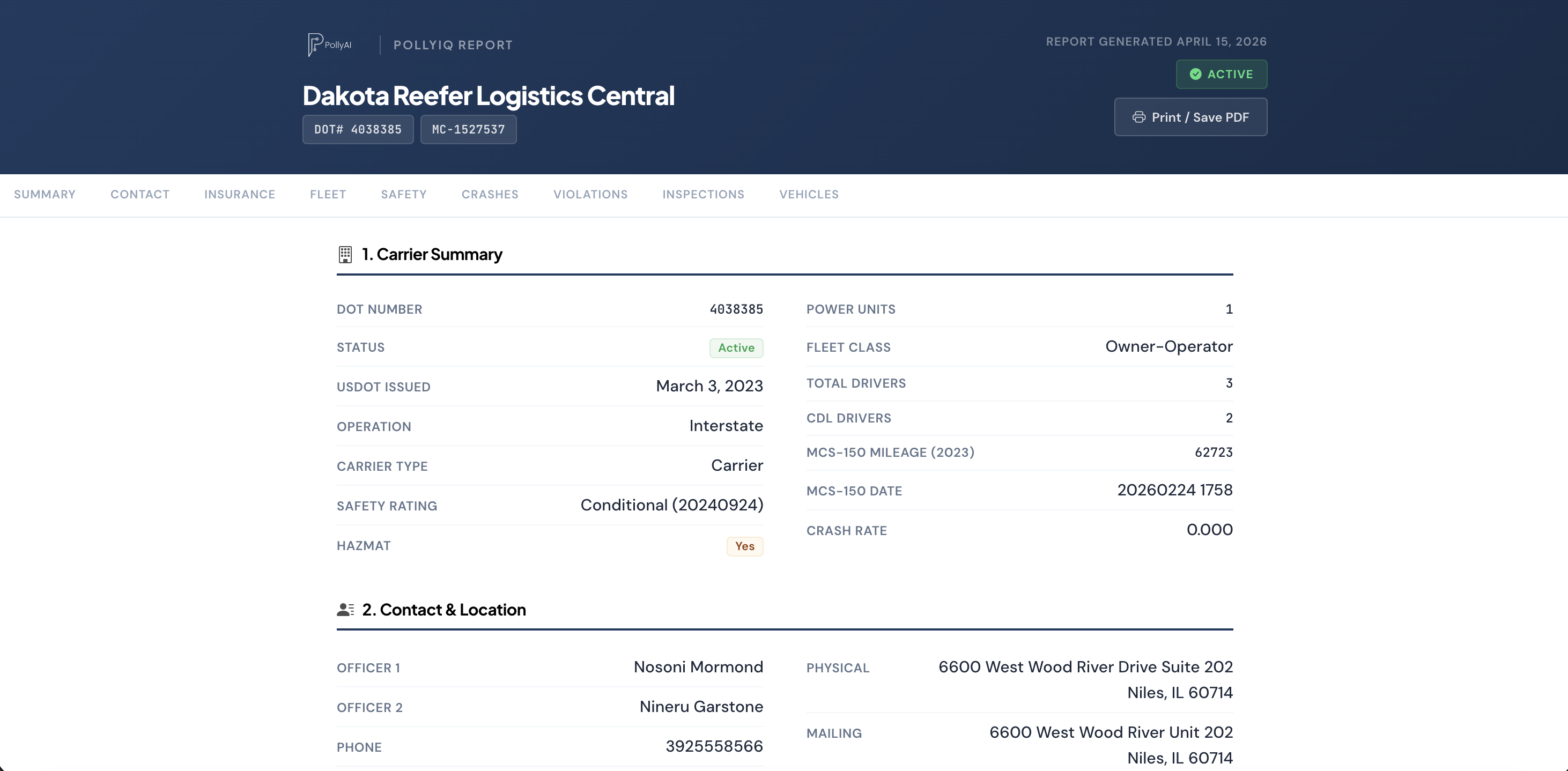
PollyAI is an FMCSA-native lead generation and outreach platform for trucking insurance agents, and the PollyIQ Report is its answer to the carrier snapshot's gaps. It pulls authority status, safety and CSA data, 24 months of roadside and out-of-service history, VIN-decoded equipment, and contact detail into one print-ready dossier for any DOT number, generated in a single click. The full breakdown lives on our truck carrier reports page.
The difference that matters for an agent is workflow. The free snapshot is a stop you make on the FMCSA site, then leave to check insurance somewhere else and equipment nowhere at all. The PollyIQ Report sits inside the same tool where you filter newly active carriers by state and equipment, pull the report, and start outreach that sends from your own email domain (you connect your Outlook or Gmail inbox). Source, qualify, and contact happen in one place instead of four browser tabs.
Pricing is public. PollyAI is $39 per month for the base platform plus $40 per month per state bundle, month to month, with the carrier reports and outreach included. You can see the full breakdown on the pricing page.
How to Pull a Carrier Snapshot and Go Deeper
A practical workflow that starts free and only pays where it earns its keep:
- Start with the free snapshot. Look up the USDOT number on FMCSA SAFER to confirm the carrier is real and its authority is active. If it is not active, you are done.
- Check the safety summary. Scan the 24-month out-of-service and crash counts against the national averages for an early read on risk.
- Decide if it is worth quoting. If the carrier fits your appetite, the free snapshot has done its job and the questions get harder from here.
- Pull the full report for the ones that matter. For carriers you will actually quote or prospect, get CSA scores, renewal timing, equipment, and contact data in one dossier rather than three lookups.
Frequently Asked Questions
What is a carrier snapshot?
A carrier snapshot most often means the FMCSA SAFER Company Snapshot, a free public record of a motor carrier's identity and safety history. You search by USDOT number, MC or MX number, or company name and get authority status, entity type, fleet size, cargo carried, and a 24-month summary of inspections, out-of-service results, and crashes. It is the baseline check most agents run before they quote a carrier.
Is the FMCSA carrier snapshot free?
Yes. The FMCSA SAFER Company Snapshot is free and public, with no login required. You only need the carrier's USDOT number, MC or MX number, or exact company name. It is the right first stop for confirming a carrier is real and active, but it was built for public safety lookups, not for prospecting or underwriting.
What does the carrier snapshot not show?
The free carrier snapshot does not show CSA BASIC percentile scores (those live on the separate FMCSA Safety Measurement System site), insurance policy details or expiration dates (those live on the FMCSA Licensing and Insurance system), VIN-decoded equipment, or an email address for outreach. Its safety rating is also blank for most carriers, because a rating is only assigned after a full compliance review.
How do I get a full carrier report instead of a snapshot?
A full carrier report pulls the pieces the free snapshot leaves scattered across separate FMCSA systems into one document. PollyAI's PollyIQ Report is a print-ready carrier dossier with authority status, safety and crash history, out-of-service data, and VIN-decoded equipment for any DOT number, built into the same tool you use to find and contact carriers.
Go Beyond the Snapshot
$39 base + $40 per state bundle. Full FMCSA data, VIN-decoded equipment, out-of-service history, print-ready carrier reports, and outreach from your own domain in one platform. No sales call required.
Start Searching CarriersMore reading: Truck Carrier Reports · What Is a CAB Report? · PollyAI Pricing
Comparing prospecting tools too? Our Carrier Software alternative comparison covers the DOT Leads product head-to-head.